

Portable ergonomic desk setup travel solutions are transforming how digital nomads, business travelers, and hybrid professionals work from anywhere—and if you depend on your laptop on the road, a small misstep in gear choice can compromise your posture, productivity, and even hardware longevity. This guide is packed with up-to-date 2024-25 market stats, peer-reviewed ergonomic research, and a travel-first spec checklist to help you pick a setup that tackles the realities of travel, not just the hype.
Key Takeaways
- Portable ergonomic desk setup travel gear must balance compactness, durability, and evidence-based ergonomics to truly work for frequent flyers and nomads.
- Independent studies show proper stands reduce neck strain by 42% and headaches by 35%, but only with the right accessories (external keyboard/mouse).
- Common issues—like wobble, poor adjustability, and bad cable management—can ruin even well-reviewed products if you don’t check real travel specs and test before you fly.
- Market snapshot — demand, scale and growth for travel-ready portable desks and laptop stands
- Who’s buying and why — buyer profiles and adoption trends for travel stands
- Researched ergonomic benefits — what independent studies show about long-term outcomes
- Most common user complaints and ergonomic pain points for travel setups
- Three crucial aspects top Google articles miss (and why each matters)
- How to evaluate travel specs — practical thresholds
- Side-by-side comparison framework to use (what to compare and sample metrics)
- Average price ranges for truly travel-practical setups and hidden costs to watch
- Independent risks and limitations — when stands aren’t enough (and what to avoid)
- Top recommended brands/models for travel in 2024 — quick hits and why they stand out
- Practical travel kit checklist & packing/test routine
- Quick FAQs
- Conclusion and decision flow
Market snapshot — demand, scale and growth for travel-ready portable desks and laptop stands
The travel-focused portable ergonomic desk setup market is not a niche anymore—it’s a mainstream, fast-growth segment driven by the global wave of remote work, digital nomadism, and frequent business travel. The broader laptop-tables market reached $6.77 billion in 2024 and is forecast to grow at a 6.5% CAGR through 2035. Specifically, the ergonomic laptop-stand segment was valued at $2.98 billion in 2025 and is projected to reach $5.42 billion by 2034 (source).
portable laptop stands accounted for roughly 54% of all laptop-stand units sold last year. Trends toward health, flexibility, and compactness mean the portable-stand subsegment, which had a 27.3% share in 2025, is expected to grow by approximately 9.6% annually—well outpacing fixed desktop alternatives. For retailers, product managers, or procurement leads, portable ergonomic desk setup travel gear is a proven inventory bet with a mature but still-growing buyer base.
Who’s buying and why — buyer profiles and adoption trends for travel stands
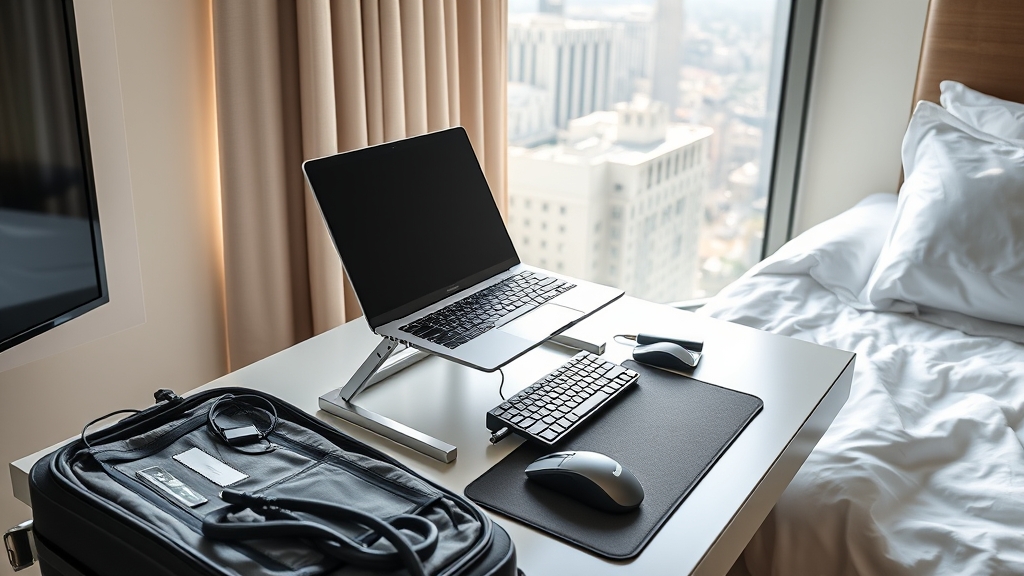
Who is driving this shift to travel laptop stand ergonomic solutions? Market data shows that 62% of global laptop users had adopted ergonomic accessories in 2024 (up from 41% in 2019), a trend most pronounced among:
- Digital Nomads: Remote workers and freelancers requiring lightweight, durable stands and peripherals for hot-desking worldwide.
- Business Travelers: Salespeople, consultants, and executives who need to upgrade cramped hotel and airport tables for long work sessions.
- Enterprises: Corporate bulk buyers equipping hybrid employees or field teams with standardized, health-compliant gear—sometimes in high 4- or 5-digit order volumes (source).
About 78% of corporate employees use laptops as their primary work device, so the demand for travel laptop stand ergonomic kits shows no sign of slowing. Even among individual consumers, the need for flexible, health-supporting gear is no longer optional.
Researched ergonomic benefits — what independent studies show about long-term outcomes
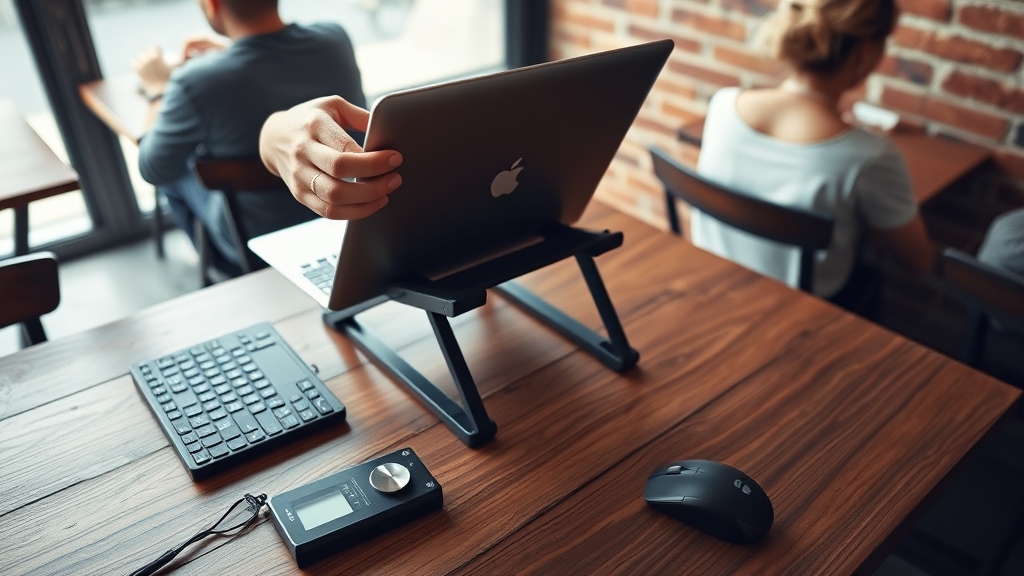
Is this investment in portable ergonomic desk setup travel kits worth it? Multiple independent studies say yes—if you use them correctly. Research published through 2024 and 2025 found that using a travel laptop stand ergonomic solution at eye level (and with an external keyboard):
- Reduces neck strain by ~42%
- Lowers incidence of cervical headaches by ~35%
- Cuts overall spinal compression by ~28% compared to unsupported laptop use (source)
However, benefits drop drastically if you type on an elevated laptop keyboard (increases wrist angle and shoulder tension)—so the “kit” approach (stand plus external keyboard/mouse) matters for real, long-term results.
Modern enterprise wellness programs and equipment budgets increasingly require these setups as base-level health safeguards for high-frequency travelers and hybrid workforces.
Most common user complaints and ergonomic pain points for travel setups
Before you buy based on glowing Amazon reviews, be aware: Most travel-focused users run into at least one of the following pain points:
- Limited height adjustment: Many stands cannot reach eye level for taller users (or sit too low for shorter users), defeating core ergonomic value.
- Wobble/instability: Lightweight models are notorious for shaking on uneven hotel furniture or airplane trays, leading to eye fatigue and distraction.
- Cooling/overheating: Some stands block ventilation or lack cutouts, causing thermal throttling and hardware degradation over time.
- Poor cable management: Charging cables drape precariously, pulling devices off desk edges or tangling during setup/takedown.
- Awkward wrist angles (without external keyboard): Typing on laptops elevated by stands strains wrists and elbows significantly (source).
- Durability complaints: Folding mechanisms can break or loosen after cycles of frequent travel. Protective cases are often required, which add weight.
Avoiding these issues is possible, but only if you check spec sheets and hands-on reviews for real-world durability and fit—especially if you travel by air frequently.
Three crucial aspects top Google articles miss (and why each matters)
Most best-of guides and product roundups skip at least three things that actually matter in the field:
- Precise, data-backed specs by user height and laptop size: Knowing the exact minimum and maximum supported screen heights (in cm/in) for your stature is essential for healthy posture—yet most content is vague.
- Sustainability and lifecycle durability: Manufacturing material matters: aluminum-based stands (now nearly 48% of market) offer up to 30% better heat dissipation and longer functional lifespan vs. plastic. Look for models or brands with end-of-life recycling options.
- Peripheral integration and cable management: Integrating a foldable keyboard, compact mouse/trackpad, USB-C hub, and cable organizers into a single, organized pouch transforms your portable ergonomic desk setup travel kit from “just good” to truly effective.
For deep dives on sustainability and desk ergonomics see our guide to sustainable home office furniture.
How to evaluate travel specs — practical thresholds
To maximize both ergonomics and portability, look for:
- Folded footprint: Stand should fit in a standard 40 x 25 x 10 cm (15.7 x 9.8 x 3.9 in) carry-on slot or laptop compartment.
- Height adjustment: Usable raised height range of at least 12–22 cm (4.7–8.7 in) above the table for most users; taller users may require up to 28 cm (11 in).
- Weight: Under 1 kg (2.2 lbs) is standard—ultralight models under 500 g (1.1 lbs) lead the trend, now adopted by 44% of manufacturers. But sub-400 g can mean more wobble or less load capacity.
- Material: Aluminum for durability and thermal performance; reinforced plastic for lighter weight but less stable feel. Avoid unbranded generics with untested blends.
- Safe load: Always check your laptop’s weight—ultraportables fine on 1 kg-rated stands; 16” MacBook Pro users should verify 2+ kg load specs plus warranty.
- Stiffness/wobble rating: Seek a stability rating in the 4/5 or 5/5 range from real-world testing or video demos.
For reference, top brands like Lifelong and Targus now offer travel stands fit for both MacBooks and heavier PC devices—and include accessories or add-ons for frequent travelers.
For more ergonomic workspace upgrade ideas, explore our standing desk converter for laptop guide or our ergonomic keyboard for wrist pain reviews.
Side-by-side comparison framework to use (what to compare and sample metrics)
With dozens of near-identical looking stands, comparing on just one user review is risky. Here’s a field-tested comparison matrix for six top travel models in 2024. Metrics include weight, size, max/min height, load, material, cooling, cable management, stability/warranty, and field notes.
| Model | Weight (g) |
Folded Footprint (cm/in) |
Height Range (cm/in) |
Load Max (kg/lb) | Material | Cooling | Cable Mgmt | Stability | Warranty | Best for… | Travel Notes |
|---|---|---|---|---|---|---|---|---|---|---|---|
| Lifelong Travel Stand | 490 | 24 x 4 x 2 (9.4 x 1.6 x 0.8) |
8–20 (3.1–7.9) |
3 / 6.6 | Aluminum | Vent slots | No | 4/5 | 1 yr | Solo nomads; lightest Apple/PC ultrabooks | Slimmest in class, no cable features |
| Targus FoldGo™ | 695 | 25 x 5 x 4 (9.8 x 2 x 1.6) |
10–24 (3.9–9.4) |
5 / 11 | Aluminum/ABS | Open mesh | Cable slot | 5/5 | 2 yr | Business travelers; 13–16” laptops | Solid, heavier duty, cable slot holds charging wire |
| Tabletote Plus | 890 | 28 x 17 x 4 (11 x 6.7 x 1.6) |
15–28 (5.9–11) |
6 / 13 | Aluminum/alloy | Full mesh | Integrated wrap | 5/5 | 3 yr | Hybrid users; need >20cm/8in height | Four-leg design, robust but bulkier fold |
| AmazonBasics Travel | 520 | 27 x 5 x 2.5 (10.6 x 2 x 1) |
8–19 (3.1–7.5) |
4 / 8.8 | Aluminum | Vent rings | No | 4/5 | 1 yr | Budget value; moderate use trips | Light, less sturdy on deep keyboard tap |
| Fellowes I-Spire | 350 | 23 x 26 x 4 (9 x 10.2 x 1.6) |
7–15 (2.8–5.9) |
2.5 / 5.5 | Plastic/TPR | Slots + ribs | No | 3/5 | 1 yr | Shorter users; ultra-light trip packers | Not optimal for >15″ screens or heavy use |
| Flexispot L90 Travel | 760 | 24.5 x 19 x 3 (9.6 x 7.5 x 1.2) |
12–24 (4.7–9.4) |
8 / 17.6 | Aluminum | Full open grid | Wrap channel | 5/5 | 2 yr | Frequent flyers; mixed desk surfaces | Most stable; slightly heavier but top class |
How to test in field: set up fully loaded (laptop + hub + peripherals) on both stable and wobbly hotel tables. Note required assembly time and repacking, check for cooling airflow under device in warm rooms. For more cable management advice, visit our cable management productivity guide.
Average price ranges for truly travel-practical setups and hidden costs to watch
Realistic price bands in 2024–25 for robust portable ergonomic desk setup travel kits look like this:
- Standalone travel stands: $28–$65 (Amazon/Fellowes/lower-end Targus)
- Premium/four-leg/folding mini desk: $60–$130 (Tabletote, Flexispot, industrial aluminum)
- Complete kit (stand + foldable keyboard + mouse + USB-C hub): $85–$200+
Watch out for:
- Shipping and customs fees (may double cost on premium imports)
- Replacement parts (pivots/hinges can fail faster under travel fatigue)
- Protective pouches/cases—often sold separately, but critical for device and stand protection in bags
Enterprise buyers often get better unit pricing in bulk, but accessory ecosystems (hubs, cable wraps) are still extra. The $6.77B total market size signals options for every price and feature window (source).
Independent risks and limitations — when stands aren’t enough (and what to avoid)
Portable laptop stand ergonomic solutions solve most, but not all, problems. Drawbacks include:
- Instability on uneven/travel surfaces: Four-leg travel mini-desks or stands with tripod bases fare better, but proper setup time is needed.
- Durability: Folding mechanisms, joints, and plastic tabs often fail before posted lifespans if used for full-time travel (airports, hotels, daily hotdesks).
- Peripheral dependency: For real ergonomics, external keyboard and mouse are required—the benefit of the stand alone is limited without these.
- Comparative discomfort: Field studies show that, even with a stand, laptop users report more neck/back pain than desktop users (source).
If you work long hours and need rock-solid stability, consider hybrid options (like Tabletote or four-leg variants) over minimalist Z-fold aluminum models. If in doubt, test borrowed models before investing.

Top recommended brands/models for travel in 2024 — quick hits and why they stand out
Here are the 2024 standout portable ergonomic desk setup travel models and what type of traveler they fit best:
- Lifelong Travel Stand: Ultralight, under 500g; best for one-bag nomads prioritizing weight. Lacks advanced cable features.
- Targus FoldGo™: Midweight, robust, with cable slot; ideal for business travelers with heavier devices. Slightly bulkier fold.
- Tabletote Plus: Four-leg, very stable; suited for field workers and conference/event use (sturdier than single-plane fold stands).
- AmazonBasics Travel: Best for occasional travelers needing a cheap, good-enough stand—light but not for heavier 15″+ laptops.
- Fellowes I-Spire: Ultra-compact and light, but plastic build; good for shorter users or day-trip setups. Less optimal for big laptops or heavy typers.
- Flexispot L90 Travel: High stability and cable channel integration; for those who need zero wobble and bring multiple devices.
What to watch for: Warranty length, listed max laptop size/weight, and user reports on repeated folding cycles before mechanical failure. For more in-depth ergonomic gear picks, see our current best laptop stand for home office desk setups and ergonomic office chair guide.
Practical travel kit checklist & packing/test routine (what to bring and how to test before a trip)
Before heading out, assemble this field-tested portable ergonomic desk setup travel kit in your carry-on:
- Travel laptop stand ergonomic (tested for max height, stability, weight)
- Folding or ultra-slim keyboard (Bluetooth/USB, with preferred tactile feel)
- Compact mouse or trackpad (avoid full-size gear for mobility)
- USB-C PD hub (with pass-through charging capability, SD card slot if needed)
- cable organizer or compact pouch for peripherals
- padded sleeve or protective case for the stand
Pre-flight test routine (2 min): Assemble full kit on your home desk. Confirm:
- Laptop is at true eye level
- All peripherals fit in carry-on slot
- Cables do not drag or dangle awkwardly
- Assembly/disassembly under 90 seconds
Travel tip: In airports/hotels, set up away from crowded coffee bars, and check for table sturdiness before loading your laptop. Avoid setups on flexible trays or easy-to-bump edges. For more device-specific setup advice, consult our USB-C docking station productivity guide.
Quick FAQs
Do I really need an external keyboard and mouse with a portable laptop stand ergonomic kit?
Yes. Research and ergonomic principles show you’ll only get neck and back benefits if you can type at a neutral wrist angle, which is impossible on a raised laptop keyboard. Always budget for foldable input devices in your travel gear.
Does a portable desk stand actually help with laptop overheating?
Very often, yes. Good stands lift the device and enable 20–30% better airflow under the case. Stands with mesh or slotted designs perform best, especially in warm hotels or coworking spaces.
How do I choose the right stand for a large or heavy laptop?
Check safe load limits (typically posted by reputable brands) and prioritize stability ratings. Four-leg or robust aluminum models are safer for 15–16” laptops than minimalist Z-stands. Choose stands rated for at least 1.5x your laptop’s listed weight.
How do I protect my stand during frequent trips?
Padded sleeves prevent hinge/joint damage. Place the stand in your carry-on in a spot where it won’t be crushed by heavy items, and always store it folded—not loosely expanded—between trips.
What about returns and warranties for travelers?
Check warranty duration before buying—most reputable models offer at least 1 year, with 2–3 years on premium options. For international travel, keep digital copies of receipts and confirm the warranty applies outside the country of purchase.
Conclusion and decision flow — what to do next
Choosing the right portable ergonomic desk setup travel kit comes down to (1) frequency of travel, (2) your stability/durability requirements, and (3) your accessory budget. If you’re on the road weekly and stability is crucial, focus on robust aluminum or four-leg mini desks. Occasional flyers can use ultralight Z-stands, but should double-check height and weight specs. With portable stands now making up approximately 54% of units sold globally—and with a massive market variety—narrow your list to three models, compare specs with our framework, and test your top pick at home before you leave. Your spine (and device) will thank you.
Ready to upgrade? Use our checklist, compare at least three models, and set up your ideal travel kit before your next trip.