

Cable management is more than just hiding clutter—it’s a measurable investment in device reliability, productivity, and workplace safety that office and IT managers can confidently justify to any stakeholder.
Key Takeaways
- Organized cable management can boost productivity by up to 20 percent and reduce cable-related failures by 30–40 percent (Research).
- Strategic planning, protective hardware, and aesthetic integration are key for long lifespan and ease of future upgrades.
- DIY solutions like Velcro straps and labeled routes often outperform store-bought kits for small setups—but large upgrades may require premium, modular systems.
- Quick take — why cable management is more than looks
- Step-by-step guide: Implementing best-in-class cable management
- Advanced analysis & common pitfalls in cable management
- Conclusion & next steps
- FAQ: Cable Management for Office & Home
Quick take — why cable management is more than looks
Effective cable management delivers proven productivity and ROI gains. Organized desks aren’t just easier on the eye—they’re validated to increase individual productivity by approximately 20 percent. Even more critical, research shows that correct cable routing, the use of strain-relief sleeves, and securing connections can reduce cable-related failures by 30 to 40 percent. This translates into fewer device outages, less time spent troubleshooting, and longer hardware lifespan (source).
Aesthetics matter for professional image, too: surveys report a 15–18 percent boost in perceived workspace quality when cables are hidden or neatly organized (source). Ultimately, cable management isn’t about cosmetic clutter; it’s about quantifiable improvements—more up time, fewer errors, less waste, and a workspace you can be proud of.

Step-by-step guide: Implementing best-in-class cable management
Here’s how to plan and justify a cable management overhaul for your office, IT suite, or home workspace with measurable results:
- Map device and power locations. Document all connections—what goes where and which devices are fixed or frequently swapped. This helps avoid overbuying hardware or missing key pain points.
- Strategize cable routes before buying hardware. Decide optimal cable paths to minimize crossings, reach outlets safely, and leave slack for moving devices. Mark cable entrances/exits on your desk.
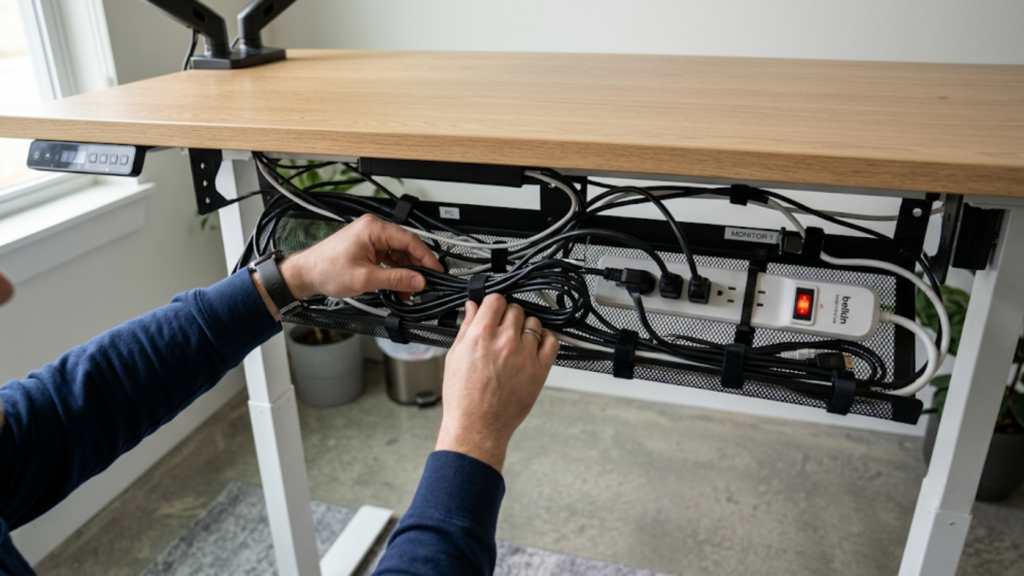
- Choose adaptable and protective hardware. Opt for Velcro over zip ties (to prevent wire damage), padded sleeves for abrasion, grommets for pass-throughs, under-desk trays for heavy adapters, and magnetic cable holders for easy cord swaps. Verify tray weight ratings and mount compatibility, especially for adjustable or thick desks.
- Install with safety in mind. Secure power strips under the desk. Stow excess lengths inside trays or sleeves, never balled up behind hardware. Avoid overtightening ties—leave a little slack (source).
- Label everything. Use printed tags, color-coded sleeves, or write-on strips so every cord is identified—essential for shared/hybrid desks and troubleshooting (source).
- Test function and mobility. Plug and unplug every device; nothing should budge or pull wires loose. Confirm power and signals to all endpoints.
- Schedule regular reviews. Every quarter, check for cables added, device moves, adhesive fatigue, or wear.
Mini-ROI Calculator & Product Cost Guide
- DIY (clips, sleeves, Velcro, labeling): ₹700–₹2000 / $10–$25 per desk
- Mid-tier (metal trays, cable boxes, bulk organizers): ₹3500–₹7000 / $40–$80 per desk
- Premium (integrated modular desks, professional-grade trays): ₹15000+ / $180+
For a ₹10,000-per-year office worker (~₹500 per day in labor), a 20% productivity boost saves ₹100/day or ₹22,000+/year per person. Reducing one equipment failure/repair per year (often ₹1700+) more than pays for quality hardware.
For similar ROI math, see our standing desk converter guide and lumbar pillow ROI breakdown.
Advanced analysis & common pitfalls in cable management
Most “fast fix” solutions skip critical steps—leading to common frustrations and avoidable costs. Verified buyers and tech forums consistently report:
- Tangles and dangling wires. These create ugly, unsafe zones below and behind desks, raising trip hazards and inviting snags.
- Undersized trays or poorly-anchored clips. Trays that can’t hold power bricks, or mounts that detach under strain, are cited as top annoyances in real-world reviews (source).
- Adhesive/fasteners losing grip. Cheaper stick-on clips and anchors routinely unstick within months—mechanical fasteners or strong magnets last longer.
- Over-tightened ties or rough tapes damaging insulation. This accelerates wear and can lead to short circuits, device malfunctions, even electrical fires over time (source).
- Device/monitor arm incompatibility. Some trays block the mounting of adjustable monitor arms—measure first and check clamp specs (more here).
- Lack of labeling/modularity. Unlabeled cords make device swaps a headache and increase downtime in shared offices.
| Mistake | Impact | Better Solution |
|---|---|---|
| Tight zip ties | Cable insulation fraying, electrical risk | Reusable Velcro straps, leave slack |
| Clip adhesives fail | Cables fall, tangling returns, safety hazard | Choose screw-in or magnetic clips/trays |
| Poor routing—cables cross or bend sharply | Brittle wires, signal loss, overheating | Plan straight, separated runs; use padded grommets |
| No labeling | Harder maintenance, waste time on swaps | Color, printed, or write-on labels at both ends |
Environmental responsibility matters, too. Well-managed cables are easier to recycle when upgrading, helping reduce e-waste (source).
If you manage a hot desk or expanding IT environment, see our guides for desk mats, USB-C docking stations, and noise cancelling headphones.

Conclusion & next steps
Smart cable management is a justified, high-ROI upgrade for any desk setup—boosting productivity, extending device lifespan, making future upgrades simple, and reducing real workplace risks. The right approach is rarely generic; focus on mapping, quality hardware selection, labeling, and periodic review. Don’t treat cable management as a cosmetic fix—treat it as an investment in every hour and dollar your team works.
Ready to overhaul your setup? Start with a map of all cables, select protective hardware, and follow the step-by-step instructions above—then enjoy a workspace that delivers day after day. Looking for setup-specific recommendations? Explore our ergonomic chair guide or see our standing desk picks for more productivity upgrades. Invest in cable management now, and you’ll save time, repairs, and frustration for years to come.
FAQ: Cable Management for Office & Home
What’s the best cable management for desk setup with limited space?
Use under-desk trays, magnetic cable holders, and Velcro straps. Plan cable routes before installation, and label each cable for easy swaps.
How often should you check or adjust your cable management setup?
Every 3 to 6 months, or whenever you add/remove a device. Check for loose adhesives, wear, or cable strain each time you reorganize.
Is there ROI in buying premium cable management hardware?
Yes. Offices see up to 20 percent productivity gains and 30 to 40 percent fewer cable-related repairs—often saving more than the hardware cost within a few months.
Should I use zip ties or Velcro straps?
Velcro straps are safer. They avoid fraying insulation and allow easy re-routing. Zip ties should never be over-tightened and are best for static (unchanging) cables only.
Does cable management improve environmental sustainability?
Yes. Properly sorted and managed cables are easier to recycle and less likely to end up as e-waste during upgrades.