

Ergonomic footrest selection matters more in 2024 than most office workers realize—a poor choice can cost you and your staff in pain, lost focus, and even serious injuries. This epic, hands-on guide arms you with evidence, real-world specs, and actionable buying steps so you can confidently pick the right ergonomic footrest for any office chair—and sidestep costly mistakes.
Key Takeaways
- Measurable risk: In 2024, ergonomic injuries made up about one-third of all workplace incidents, with 80,000–100,000 US office workers suffering foot-related musculoskeletal disorders annually.
- Specs matter: Key features like solid metal/wood frames, at least 2–5 inch adjustability, lockable tilt, anti-slip surfaces, and ≥250 lb load ratings prevent common injuries and durability issues.
- Real cost vs. value: Low-end plastic models often fail on stability and lifespan; premium builds with better mechanisms pay off for staff comfort, productivity, and long-term reliability.
- Why foot ergonomics matter in 2024
- Practical buyer’s roadmap: Matching specs to pain points
- Advanced analysis & common pitfalls
- Conclusion
- FAQ
Why foot ergonomics matter in 2024
Poor foot support at your desk is not just an annoyance—it’s a measurable risk factor for musculoskeletal disorders (MSDs) that drain productivity and cause prolonged absences. In 2024 alone, US employers reported 2.5 million nonfatal workplace injuries, with ergonomic cases comprising about one-third—that’s roughly 825,000 workers. Of these, foot-related MSDs affect approximately 80,000 to 100,000 office professionals every year. These injuries—ranging from plantar-flexor strains to chronic lower-leg discomfort—increase the risk of lost workdays and reduced staff focus. In fact, MSDs account for 34% of all workdays lost across industries, costing billions annually, according to the American Society of Safety Professionals. For modern, desk-bound office staff and managers, an ergonomic footrest is not a luxury—it’s vital risk management.

Unresolved lower-leg and foot discomfort leads to worker distraction, lost concentration, and compensatory postures that accelerate back, hip, and even neck strain. Ignoring under-desk foot ergonomics in a corporate wellness program is like ignoring your office lighting or air quality—and the measurable fallout, from lost time to insurance claims, hits both individuals and managers. That’s why it’s time to apply evidence, not guesswork, to your next ergonomic footrest purchase.
Practical buyer’s roadmap: Matching specs to pain points
Here’s a step-by-step breakdown for professionals and office managers who want to eliminate foot fatigue, target the right technical specs, and avoid the most common durability failures:
Step 1: Map your pain to technical specs
- If you’ve felt LEG NUMBNESS or ANKLE STRAIN, prioritize footrests with a broad, lockable tilt or rocking range (helps adjust lower-leg angles throughout the day).
- If your complaint is SLIDING or INSECURITY, demand textured anti-slip surfaces and real rubber feet. Thin plastics and bare bases almost always fail here.
- Chronic KNEE PAIN? Ensure the footrest adjusts low enough so your knees never sit above your hips; the best footrest for office chair use offers a full 2–5 inch range (most do not).
Research confirms: models built from rigid metal or wood (with metal brackets) outperform all-plastic competitors—providing sturdier, more reliable support and outlasting cheaper options in high-use settings.
For a full ergonomic solution, consider pairing with an ergonomic office chair designed for back pain and, for multi-monitor setups, use a monitor arm to further reduce postural strain.
Step 2: Spot the most common user complaints (and how to prevent them)
- Interference with chair casters or rolling—measure under-desk clearance and check if platform width allows for free movement. If possible, test for fit before buying.
- Platform detachment/sliding—avoid footrests with loose-fitting plastic platforms. Select solid construction and integrated rubber grips.
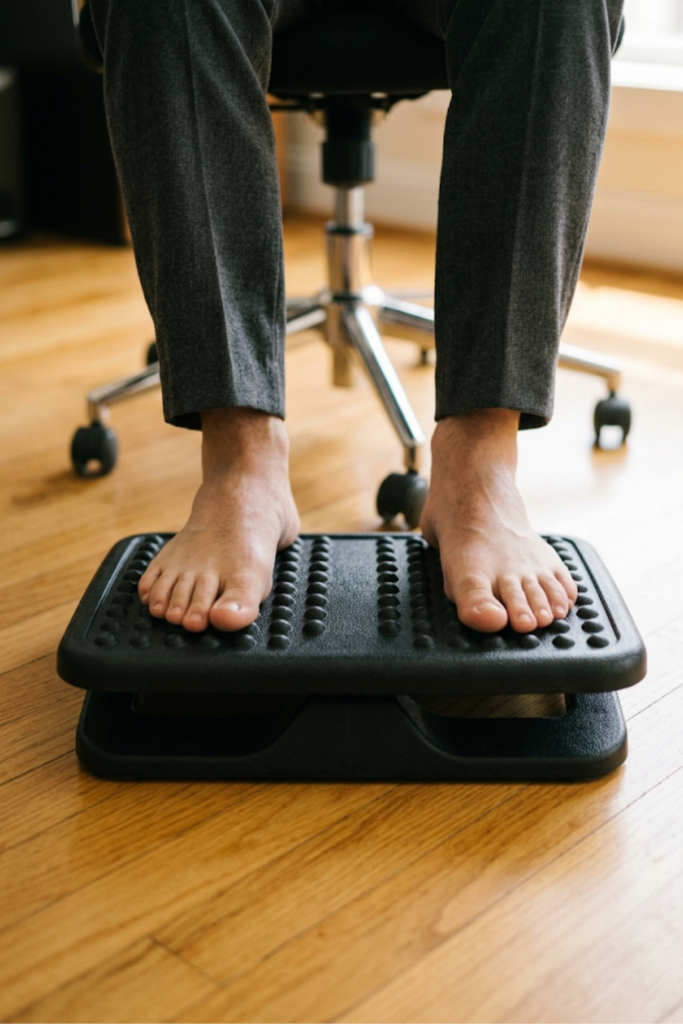
- Uncomfortable “massage” bumps—test surfaces by hand; deeply textured bumps are often disliked in real use, especially over long workdays (source).
- Noisy rocking—look for footrests advertised with silent bearings or low-noise glides.
- Insufficient height range—choose models with visually marked or click-lock height settings.
- Short lifespan—demand proof of warranty coverage for breakage, cracks, and mechanism failure. Durable footrests now offer 2–5 year warranties if they’re metal or wood.
Step 3: Use the spec checklist
- Material: Prefer metal/wood platforms, reinforced metal brackets, and non-slip top surfaces over thin, flexible plastic.
- Adjustability: Minimum 2–5 inch range (3–6 inch is common, but shorter users may need more).
- Load Rating: At least 250 lb (many budget models fail below this threshold).
- Surface Texture: Textured rubber mats or grooved plastic (not deeply pointed massage bumps or slick surfaces).
- Noise Level: Low-noise or silent mechanisms are critical, especially in open-plan offices.
For managers purchasing in bulk, demand product documentation proving compliance—and verify the return and warranty process. Consider models with free trial periods if supplier offers them.
It’s also worth reviewing standing desk converter options. Employees alternating between sitting and standing need a footrest that accommodates quick transitions and variable desk heights.
Advanced analysis & common pitfalls
Despite slick marketing, many highly-rated footrests disappoint after months of real-world use. Here’s a breakdown of the critical problems—and how to spot red flags from user reviews:
| Feature | Common Problem | What Actually Works |
|---|---|---|
| Material/Frame | Plastic base cracks, platform detaches, premature flexing | Metal or solid wood frames with metal brackets |
| Adjustability (Height/Tilt) | Range too small; knees forced above hips; mechanism jams | 2–5 inch height/tilt with clearly marked stops or lockable tilt |
| Surface/Grooves | Massage bumps uncomfortable on bare feet; smooth platform too slippery | Textured or grooved rubber surfaces (not oversized bumps) |
| Slip Resistance | Slides on hardwood or tile despite claims | Rubber feet or pads; weighty, non-hollow platform |
| Chair Compatibility | Blocks chair wheels; platform too wide or tall | Right width, platform under 6″ tall, test with staff chairs |
| Noise & Movement | Clicks or squeaks when rocked; annoys others | Silent or very low-noise glide/tilt mechanisms |
Review data confirms: Cheaper plastic models—even those topping bestseller lists—are most likely to slide, flex, break, or frustrate staff within six months. For lasting results, invest in proven builds and demand clear warranty documentation. Always ask:
• How long is the warranty (and does it cover cracking, base breakage, or mechanism failure)?
• What’s the actual tested user load rating?
• Can you return it easily if it interferes with your specific office chair?
Expand your ergonomic program not just with a quality footrest, but also consider a keyboard designed for wrist pain and a lumbar pillow for back support to further cut MSD risks (research reference).

Conclusion
Selecting the right ergonomic footrest isn’t about choosing the cheapest or the one with the fanciest gadgets—it’s about matching the build and adjustability to real human pain points that cost money, comfort, and productivity. Evidence shows models with sturdy metal or wood frames, at least 2–5 inch height adjustment, solid anti-slip design, quiet movement, and ≥250 lb load rating are proven to reduce knee and foot strain for long-hour desk users. Prioritizing the right specs over marketing hype protects both your team and your budget—while directly reducing injury risk and lost workdays linked to poor foot ergonomics.
Ready to make an informed upgrade? Choose your next ergonomic footrest with confidence, demand warranty clarity, and enjoy long-term comfort at every desk. For more actionable ergonomics guides, see our resources on standing desks and vertical mice for carpal tunnel.
FAQ
How do I know if my footrest height is correct?
Your knees should be level with or slightly below your hips when seated. If your knees rise above hip level, lower the footrest. The best footrest for office chair setups offers a 2–5 inch adjustment range to achieve this.
Can a footrest damage or interfere with an office chair’s casters?
Yes. Many users complain that wide or tall footrests physically block chair wheels or the chair base. Always check your chair’s base width and measure under-desk clearance before choosing a footrest.
Are “massage” bumps or textures actually beneficial?
Most users find oversized massage bumps uncomfortable, especially if working for hours. Look for a gently textured, non-slip surface instead of aggressive bumps for all-day use.
What’s a “realistic” durability expectation for an ergonomic footrest?
High-quality metal or wood platforms should last several years with daily use. Avoid plastic models claiming high durability unless backed by at least a two-year warranty covering cracks, detachment, and mechanism failures.
Is it OK to stand on a footrest?
No. Standing on a footrest can lead to cracking, instability, and injury. Follow OSHA and NIOSH guidance—use footrests only for seated support and choose durable materials.